There isn’t much to the Family Room. It’s really just the TV, the Bar and a bunch of remotes.
Watching TV:
Turn the TV on with the FireTV remote. Choose the Guest user profile to enjoy Amazon Prime Video, Netflix, AppleTV and more. Hulu will not work. You can use the Chromecast Option (TV HDMI 3) to stream your own Hulu account to the TV.
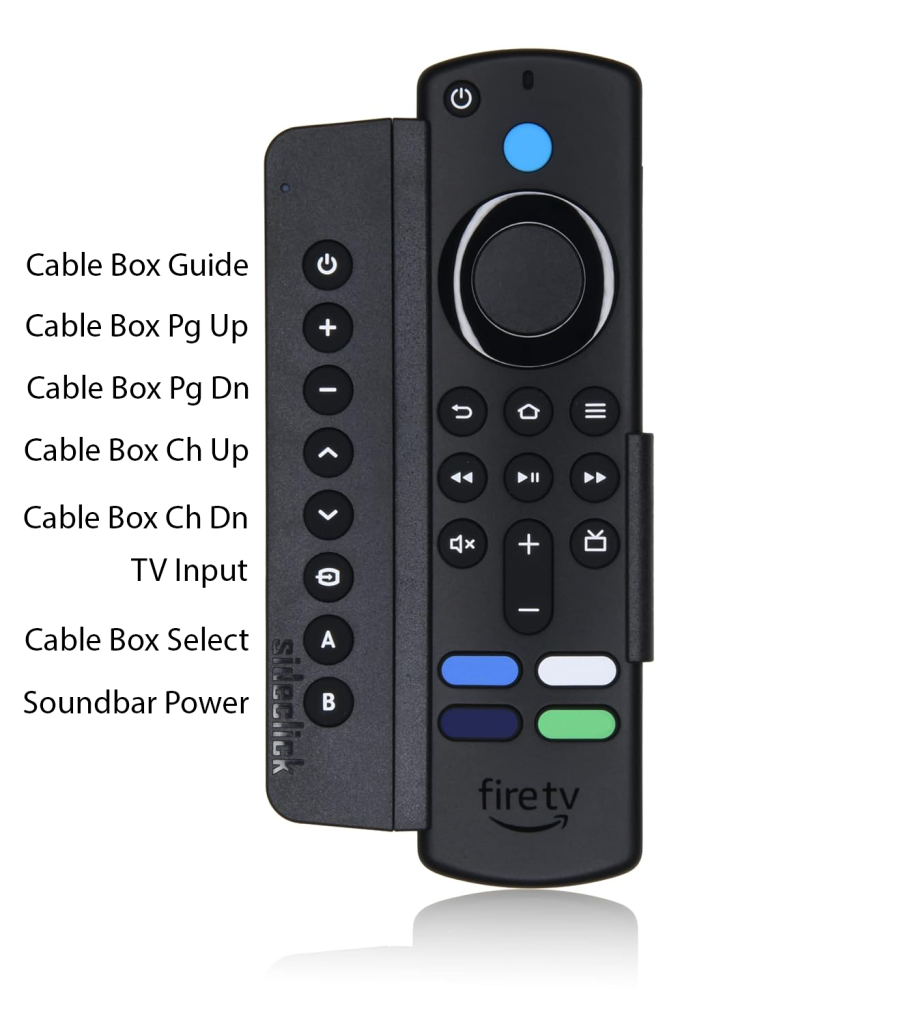
If you don’t see FireTV home page, you’ll need to change the input using the TV Input button.
To watch Cable TV, make sure the cable box is turned on. It is the black box under the TV that says Amino on it and the LED should be blue (On). If it is red (Off), use the Amino remote to turn it on then return to the FireTV remote. Press the TV Input button until HDMI 2 is selected. Wait a few seconds for the TV to change inputs.
Chromecast
Use the TV Input button to choose the Chromecast input (HDMI Input 3) if you want to watch content from your phone or laptop. On the video or media you’re watching, tap Cast  .
The Bar
If trying to watch the TV has driven you to drink, head over to the bar and enjoy a cocktail or some wine. Help yourself to anything on the bar, sodas are in the cabinets on the right or the drink fridge. Just let us know if you finish anything so we can replace it on our next trip.